
 News
News 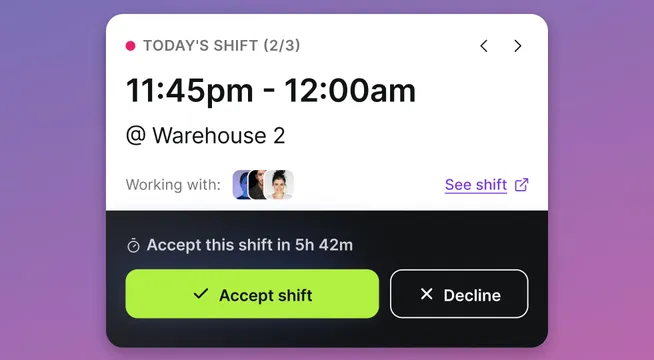
Superplan launches a faster, clearer way to run shift work
Shiftparade is now Superplan.
The new name comes with a major product update built for the people who plan, fill, publish, check, and fix shifts every day.
We've been busy, and we're even more excited to share what we've delivered:
A cleaner workspace for daily workforce planning
A new look with more room to work
Superplan now has a cleaner interface, sharper navigation, and more space for the schedule itself.
You get grouped controls, calmer screens, and a sleeker grid that helps you focus on the actual work: planning coverage, moving shifts, publishing updates, and spotting what needs attention.
This is not decoration: scheduling is dense work. Lighter screen makes you move faster.
Your personal dashboard
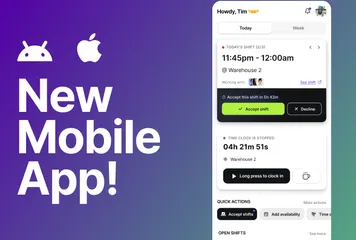
Every user now gets a personal dashboard!
You can see your weekly schedule, today’s shift, and key quick actions in one place. Employees can add availability, clock into their shifts and breaks, claim open shifts, and soon see announcements and recent chats.
For managers, this means faster action. For employees, it means less confusion.
Less manual work for schedulers and more drag & drop
Recurring shifts and mass selection on the grid now work together to cut manual effort: set repeat patterns once so future shifts are created automatically and drag across the schedule to select and manage whole blocks in one action. When the week changes under pressure, these speed gains stack up fast.
Better ways to fill and confirm shifts
Open shifts
Open shifts give you a cleaner way to fill gaps.
You can mark shifts as open, define how many openings you need, and let employees pick them up. Once the shift fills, it stops appearing as an open opportunity. If someone releases it, the opening can return.
This replaces a lot of manual chasing. Shift leads spend less time asking who can work and more time doing the real work.
Shift acceptance
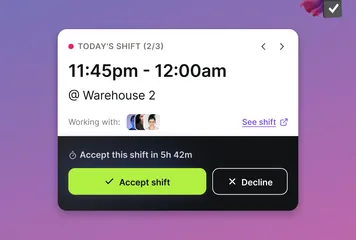
Shift acceptance can now be enabled in settings.
When you publish shifts, employees can confirm whether they accept them. You can see what is pending, accepted, declined, or expired.
That helps you verify who has acknowledged the schedule, and who has not.
Superplan customers told us: “Publishing the rota only broadcasts intent; real confidence comes when the team confirms receipt.” Superplan now helps with that.
Availability for multiple days
Employees can now submit availability for multiple days at once from the personal dashboard in just a few clicks.
That gives schedulers better input before they build the plan. It also gives employees a simpler way to say when they can work, without sending side messages or waiting for a manager to ask.
More control over published schedules
Granular shift publishing
You can now publish or unpublish individual shifts. Release confirmed shifts, hold back unfinished ones, and keep schedule communication tighter. This gives you more control when plans change, which always happens.
More reliable workforce records
Emergency contacts
Superplan now supports emergency contacts in employee profiles.
You can store detailed contact information and enable review prompts based on your chosen cycle. Employees can be reminded to check and confirm their emergency contact details, so you do not have to chase them manually.
This helps keep important workforce data current, especially in teams with high movement, seasonal staff, or distributed locations.
Better overnight time handling
Timesheets now handle overnight work more clearly.
When a time record crosses midnight, Superplan can show it across the relevant days and split the worked time correctly between dates. Superplan marks night shifts and makes it easier to review in timesheets and reports.
If you run hospitality, security, logistics, healthcare, production, or late trading teams, this removes a common source of timesheet confusion.
Superplan now supports more teams, in more languages
Superplan now supports English, Spanish, Brazilian Portuguese, German, French, Italian, Polish, Dutch, and Latvian.
This update helps more employees and managers use Superplan in the language that fits their workday.
We are not stopping here. Stay tuned for the next wave of Superplan updates as we bring clarity even closer to your workplace.
FAQ
What changed from Shiftparade to Superplan?
Shiftparade is now Superplan.
- The brand changed from Shiftparade to Superplan.
- The product launched a major set of new workforce planning features.
Is Superplan still focused on shift-based teams?
Yes. Superplan remains focused on shift-based organizations.
- Plan shifts and fill coverage gaps.
- Manage availability, confirm schedules, and track time.
- Keep workforce records cleaner before payroll.
What are the biggest new features?
- Personal dashboard and cleaner interface.
- Recurring shifts, open shifts, and shift acceptance.
- Granular publishing and mass grid selection.
- Emergency contacts, improved availability submission, and better overnight timesheet handling.
- Broader language support.
How do open shifts help my team?
- Create open shifts for unassigned work.
- Let eligible employees pick up shifts directly.
- Track remaining openings without running the process through messages.
What does shift acceptance solve?
- Shows who confirmed, declined, is pending, or expired.
- Closes the gap between publishing a schedule and knowing who is actually ready.
Does Superplan support multilingual teams?
Yes.
- Supported languages: English, Spanish, Brazilian Portuguese, German, French, Italian, Polish, Dutch, and Latvian.